
Controls and keybinds
Updated · Trollheim Wiki Editorial Team
In the technical playtest you cannot rebind keys. The 12 November 2026 post says so directly, and it warns that AZERTY keyboards may not be able to play the game as intended. Use a QWERTY layout for this build. Wait for Early Access if a custom layout is the only way you can play.
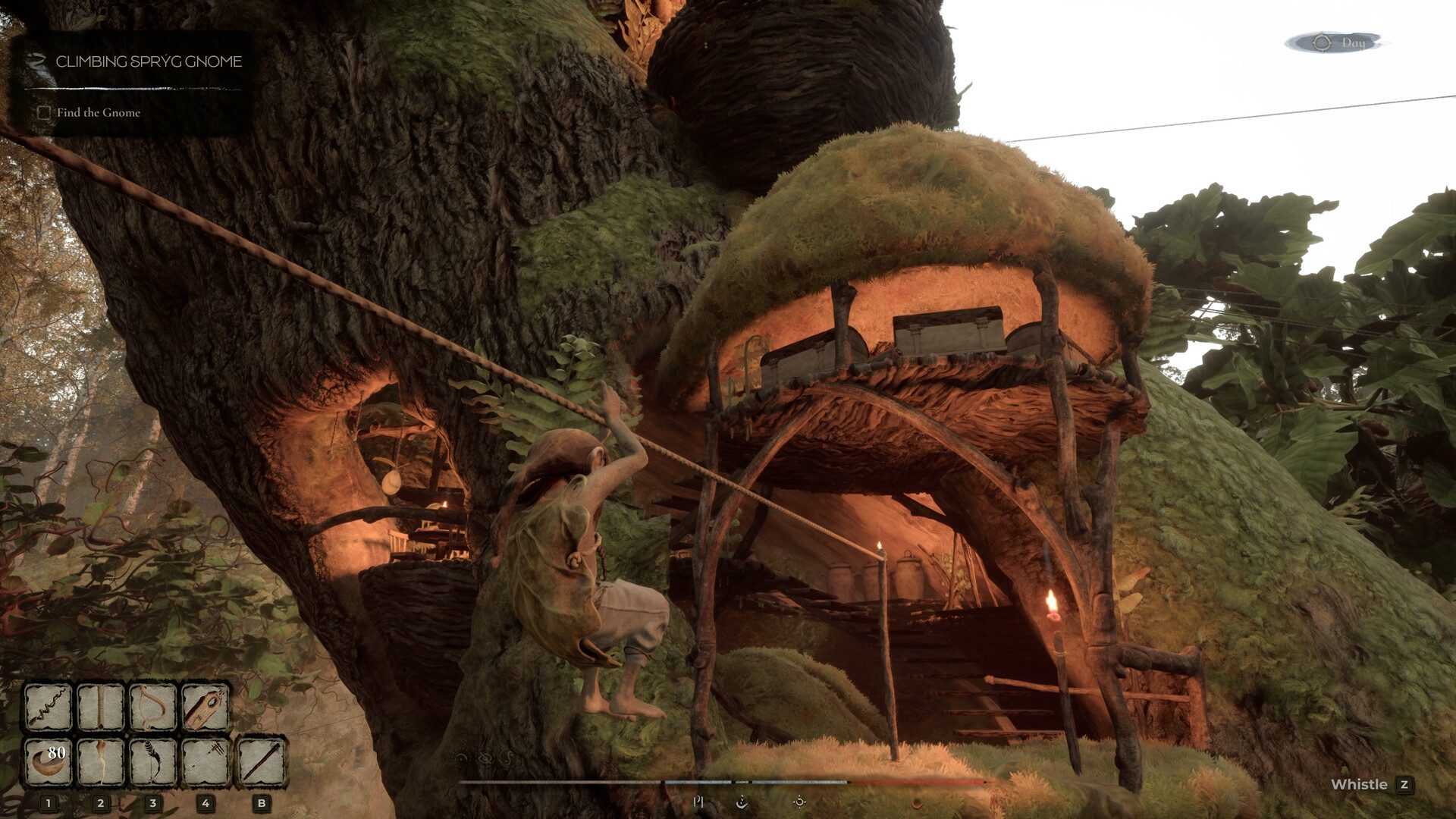
Keys the official screenshot shows
One store screenshot of a gnome climbing to a treehouse prints the binds that are safe to repeat:
- Whistle is labeled on Z.
- The hotbar has five slots, labeled 1, 2, 3, 4 and B.
- A day indicator sits in the corner.
- A quest tracker can show a task such as Climbing Spryg Gnome, with the objective Find the Gnome.
Those labels are on the image. The screenshot does not name the item inside each hotbar slot, so none of those keys is labeled here as an axe or any similar tool. Try the slots in a safe spot beside your shelter, on flat ground, before you test them on a trunk.
Whistle is the call to use when a co-op partner disappears into the branches. The forest is a climb, and a friend one pine over is easy to lose. Press Z, then look for movement on the trunk rather than sprinting the floor. Co-op is built for that kind of separation, up to 8 players.
What is not on the screenshot
Movement keys, jump, interact, the map and the build menu are not printed in the store screenshots used here. They are in the build, because you climb, gather and place structures, but the exact letters are not published in the news posts. Do not trust a random key list that fills those gaps. The playtest will not let you fix a wrong guess by rebinding.
The store page does mark two access features. Playable without Timed Input is on the feature list, so the game is not asking for quick-time presses. Save Anytime is also flagged. Neither line is a keybind.
Controller, Deck and keyboard
The store page's controller block is filled in, and every gamepad flag is off. Full and partial Xbox support are off. PlayStation 4 and PlayStation 5 support are off. Steam Input is off. Keyboard support is not marked as missing. Plan on mouse and keyboard. A pad is not a supported way into this playtest.
Valve has not published a Steam Deck rating. Platforms covers that. Do not buy a Deck for this test on the hope that the binds will be friendly. You cannot rebind them.
Warning: AZERTY players should skip the playtest or switch the operating system to a QWERTY layout before launching. The studio already said those keyboards may not work as intended, and the options menu will not save you.
How to practice the binds you do have
Start a solo offline session, which the store page supports, so a missed key does not drop a host. Climb one trunk using the quest prompts, open the hotbar slots one at a time, and press Z once you have a second gnome or a second player in view. Then read saves and quit only after the save finishes. A texture bug is tied to quitting mid-save, and no key will undo it.
When Early Access adds rebinding, this page should be retired for a full list. Until then, the honest list is Z, 1, 2, 3, 4 and B, plus a QWERTY keyboard.
FAQ
Can I change Whistle off Z?
Not in the playtest. The studio turned rebinding off.
What is the B slot?
It is the fifth hotbar key printed on the official screenshot. The item in that slot is not labeled.
Is there controller support?
The store page says no. Xbox, PlayStation and Steam Input flags are all off.
Will Early Access have rebinding?
The playtest post describes the missing rebind as a playtest limit. It does not promise a date for the options menu. Treat rebinding as part of the Early Access build you do not have yet.
Sources: Steam news 12 November 2026, Steam store screenshot, Steam store page